
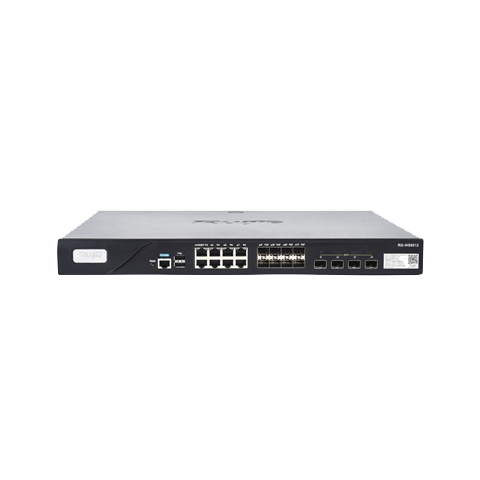
RG-WS6512
- Layered management and control for large networks
- Switching between centralized and local forwarding
- Load balancing between APs, dynamic bandwidth allocation for STAs, 5G band-select, smooth network connection
Product Overview
The RG-WS6512, a high-performance wireless controller developed by Ruijie Networks, is a future-proof wireless network device that is suitable for higher education, general education, government, and financial scenarios. It can be seamlessly integrated into any Layer 2 or Layer 3 network without changing the existing network architecture or hardware devices, enabling secure wireless network control. The RG-WS6512 can manage 128 wireless access points (APs) by default. With license upgrade, it can manage up to 1,152 generic APs or 2,304 wall-mounted APs.
The RG-WS6512 can enable powerful centralized and visualized management and control, greatly simplifying implementation and deployment of wireless networks. With enhanced security and clustering technologies, the RG-WS6512 provides network services through identity-based networking, allows multiple wireless controllers to share user databases, and enables STAs to seamlessly roam across different areas of a network. This design ensures security and session integrity during mobile roaming, making it fit for data interaction and smooth voice services over Wi-Fi communication.
| Key Specification | RG-WS6512 |
|---|---|
| Number of manageable APs |
128 (default), 2,304 (max.) Note: The number of APs that can be managed by the AC is subject to the AP model. See the Ordering Information for details. |
| Max. number of configurable APs | 4,096 |
| Maximum number of manageable STAs |
32,768 Note: The maximum number of STAs that can be managed by the AC is subject to the network environment. Contact technical support team for details. |
| 802.11 forwarding capacity | 40 Gbps (subject to the wireless network environment) |
| WLAN service |
Max. number of WLAN IDs: 4,094 Max. number of associated STAs per WLAN: 32,768 |
| Number of VLANs | 4,094 |
| Port |
4 x 10GE SFP+ ports 8 x 1GE combo ports (SFP interface and 10/100/1000Base-T auto-negotiation electrical interface) Port 1 can be used as an out-of-band management port (MGMT). 1 x RJ45 console port 2 x USB ports |
| Power supply |
2 x RG-PA70I 70 W AC power modules A power module is delivered with the main unit. You can buy one more optionally. Power input: 100 V AC to 240 V AC, 50 Hz to 60 Hz, 10 A (steady state) Power output: 12 V DC, 5.83 A |
| Max. power consumption | 70 W |
| Rack height | 1 RU |
| Applicable software version | RGOS11.9(6)W1B1 or later |
| Network management platform |
Web-based management (Eweb) WIS-based management (RG-iData-WIS) RG-Cloud |
Hardware Specifications
| Hardware Specification | RG-WS6512 |
|---|---|
| Dimensions (W x D x H) | 440 mm x 340 mm x 43.6 mm (17.32 in. x 13.39 in. x 1.72 in.) |
| Weight |
Main unit:5.9 kg (13.01 lbs) A power module is delivered with the main unit. Power module: 0.4 kg (0.88 lbs) Shipping: 7.03 kg (15.50 lbs) |
| Status LED |
1 x system status LED (Ruijie Logo) 8 x 1000M electrical port LED 8 x 1000M optical port LED 4 x 10GE optical port LED |
| Button |
1 x Reset button ● Press the button for shorter than 2 seconds. Then the device restarts. ● Press the button for longer than 5 seconds. Then the device restores to factory settings. |
| Environment |
Storage temperature: –40°C to +70°C (–40°F to +158°F) Storage humidity: 5% to 95% RH (non-condensing) Storage altitude: 0 m to 5,000 m (0 ft. to 16,404.20 ft.) Operating temperature: 0°C to +45°C (32°F to 113°F) Operating humidity: 10% to 90% RH (non-condensing) Operating altitude: 0 m to 5,000 m (0 ft. to 16,404.20 ft.) Note: At an altitude between 3,000 m (9,842.52 ft.) and 5,000 m (16,404.20 ft.), every time the altitude increases by 220 m (721.78 ft.), the maximum temperature decreases by 1°C (1.8°F). |
| Fan |
Built-in fans Right-to-left airflow Fan speed adjustment Fan fault alarm |
| Acoustic noise | < 78 dB |
| Mean Time Between Failure (MTBF) | 400,000 hours (44 years) at the operating temperature of 25°C (77°F) |
Software Specifications
| Basic Function | RG-WS6512 |
|---|---|
| WLAN | |
| 802.11 protocols | 802.11, 802.11b, 802.11a, 802.11g, 802.11d, 802.11h, 802.11w, 802.11k, 802.11v, 802.11r, 802.11i, 802.11e, 802.11n, 802.11ac, and 802.11ax |
| CAPWAP |
Layer 2 and Layer 3 topology between an AP and an AC An AP can automatically discover the accessible AC. An AP can be automatically upgraded through the AC. An AP can automatically download the configuration file from the AC. CAPWAP through NAT |
| Roaming |
Intra-AC Layer 2 roaming Inter-AC Layer 3 roaming Intra-AC roaming handoff time < 50 ms 802.11R roaming in a VAC 802.11R roaming between ACs Centralized forwarding Local forwarding |
| Forwarding mode |
Centralized forwarding Local forwarding WLAN flexible forwarding (centralized forwarding is used for DHCP packets in local forwarding mode, and 802.1X/web/MAB authentication is not supported) |
| Wireless QoS |
AP/WLAN/STA-based rate limiting (WLAN/STA-based rate limit range: 8-261,120 in the unit of 8 Kbps. For example, if you set the value to 8, the rate limit is 8 x 8 Kbps = 64 Kbps.) Static and intelligent rate limiting based on STA quantity Intelligent and dynamic rate limiting based on channel utilization Fair scheduling |
| User isolation |
Layer 2 user isolation in WIDS configuration mode User isolation in a VLAN in local forwarding mode |
| Reliability |
AC virtualization Max. number of virtualized ACs : 4 AC failover Multi-AC hot standby (1+1 A/A and A/S hot standby, and N+1 hot standby) Multi-AC cluster (N-to-N) Remote intelligent perception technology (RIPT) Non-stop service during upgrade |
| STA management |
Access control based on the number of STAs associated with the AP Access control based on the number of STAs associated with the SSID Balanced access control based on the number of STAs associated with the AP Balanced access control based on the AP traffic Balanced access control based on the AP frequency band Band steering Configuration of the RSSI threshold in dB (Range: 0-100) Configuration of the STA idle timeout period in seconds (range: 60-86,400) |
| WLAN optimization | Adjustment of the transmit power for beacon packets or probe responses |
| RF management |
Country or region code setting Manual setting of the transmit power Automatic setting of the transmit power Manual setting of the operating channel Automatic setting of the operating channel Automatic adjustment of the data rate Automatic selection of channel width AP load balancing based on traffic and STA quantity Band selection Radio Frequency Interference (RFI) detection and mitigation |
| Security and Authentication | |
| IPv4 security authentication |
Web authentication 802.1X authentication MAB authentication SMS authentication QR code-based authentication Max. number of STAs supported by the built-in Portal server: 7,500 |
| IPv6 security authentication |
Web authentication: IPv6 audit 802.1X authentication: IPv6 audit |
| IEEE 802.11 security and encryption |
Multi-SSID mode SSID hiding IEEE 802.11i-compliant PSK authentication WPA and WPA2 WPA3: WPA3-Personal (SAE), WPA3-Enterprise (CCMP, 128-bit), and WPA3-Enterprise (GCMP, 192-bit) WEP (WEP/WEP128) TKIP CCMP Anti-ARP spoofing |
| ACL | Max. number of ACEs: 131,072 |
| CPP | CPU Protect Policy (CPP) |
| NFPP | Network Foundation Protection Policy (NFPP) |
| WIDS | Wireless Intrusion Detection System (WIDS) |
| AP virtualization | Supported |
| Routing and Switching | |
| MAC | Max. number of MAC address entries: 131,072 |
| ARP | Max. number of ARP entries: 81,920 |
| IPv4 protocols |
Ping and traceroute DHCP server, DHCP client, DHCP relay, and DHCP snooping DHCP address pools ● Max. number of IPv4 address pools: 2,000 ● Max. number of IPv4 addresses: 81,920 DNS client NTP Telnet TFTP server and TFTP client FTP server and FTP client Neighbor discover |
| IPv6 protocols |
DNSv6 client DHCPv6 relay, DHCPv6 server, and DHCPv6 client DHCP address pools ● Max. number of IPv6 address pools: 256 ● Max. number of IPv6 addresses: 2,048 TFTPv6 client FTPv6 server and FTPv6 client IPv6 CAPWAP ICMPv6 IPv6 ping 6 over 4 manual tunnels, 6 to 4 automatic tunnels, and ISATAP Manually configured IP addresses and automatically created local addresses IPv6 traceroute Neighbor discovery |
| IPv4 routing |
Static routing, RIP, and OSPFv2 IPv4 routing entries: 8,192 |
| IPv6 routing |
Static routing, RIPng, OSPFv3 IPv6 routing entries: 10,000 |
| Multicast |
Max. number of static routing entries: 2,048 Max. number of multicast group routing entries: 4,096 |
| Management and Maintenance | |
| Network management |
RMON SNMP v1/v2c/v3 Syslog |
| User access management | Console port login,Telnet login,SSH login,and FTP upload |
Value-added Software
The following value-added software functions can be achieved with the WIS solution (used with RG-iData-WIS and AP).| Value-added Software | RG-WS6512 |
|---|---|
| Intelligent O&M | |
| Experience |
Network operation analysis, such as device stability and signal coverage Measuring users' network experience based on indicators such as the latency, packet loss, signal strength, and channel utilization, and visualizing results of the network experience Statistics on the number of online and offline failures of STAs associated with different APs, average signal strength, and other parameters VIP monitoring and alarm, and custom alarm thresholds STA global experience map and experience coverage evaluation based on the time range STA access protocol replay and fine-grained STA fault diagnosis Note: To support the preceding functions, ensure that the AP works in Fit mode. |
| Network optimization |
Network performance optimization, including one-click network optimization and scenario-based optimization Client steering to cope with roaming stickiness, and experience indicator comparison Client steering to cope with remote association, and experience indicator comparison One-click diagnosis – analyzing problems and providing suggestions |
| Big data |
Baseline analysis – recording the configuration, version, and other changes, and tracking network KPI changes Time capsule – analyzing the device version and configuration change history |
| Regional analysis | Batch generation of building floor information – uploading floor plans, and dragging and dropping AP positions |
| One-click report | One-click health report – generating a report on the overall operation of a network |
| Security radar | Unauthorized Wi-Fi signal location, presentation by category, and containment |
| Cloud Management | |
| Management and maintenance |
Uniformly connecting, managing, and maintaining APs, ACs, and other devices, batch device configuration and upgrade, and other functions Deployment through Zero Touch Provisioning (ZTP) – creating configuration templates and automatically applying configured templates One-click discovery of the wired and wireless network topology and topology generation |
| Cloud Authentication | |
| Authentication mode |
SMS authentication, fixed account authentication, one-click authentication, Facebook authentication, Instagram authentication, voucher authentication, and other authentication modes Authentication implemented in the cloud, without the need to deploy the local authentication server |
| Customized portal | Customized Portal authentication page for mobile phones and PCs |
| SMS gateway | Interconnection with SMS gateways of GUODULINK and Alibaba Cloud |
| Platform Capabilities | |
| Big data capabilities |
Mainstream persistence solutions based on Hadoop, MongoDB, and MySQL, providing distributed storage capabilities Spark-based big data computing capabilities Data warehouse building based on Hive, and data model conversion, integration, and other functions |
| Hierarchy and decentralization |
Authorizing different applications for different users to meet service needs of different departments Granting operation permissions to administrators in different scenarios |
| System management | Account operation, authorization configuration, email configuration, configuration backup, exception alarms, and other system management functions |
Regulatory Compliance
| Regulatory Compliance | RG-WS6512 |
|---|---|
| Regulatory Compliance | IEC 62368-1, EN 62368-1, EN 55032, EN 55035, EN 61000-3-3, EN IEC 61000-3-2, and ETSI EN 300 386 |
Cataloge
Hướng dẫn cài đặt
Cài đặt nhanh
Các Sản phẩm khác


-1.png)

-1.png)


